
Point cloud data has become a critical input for creating accurate as-built documentation in construction, renovation, and infrastructure projects. However, capturing scan data is only the first step. The real value lies in how efficiently and accurately that data is processed, interpreted, and converted into usable CAD or BIM models.
Well-defined point cloud workflows ensure that scan data translates into reliable as-built drawings and models that design and construction teams can confidently use. This article outlines best practices for converting point cloud data into accurate as-built models while avoiding common pitfalls.
What Are Point Cloud Workflows?
Point cloud workflows refer to the structured process of converting raw scan data—collected using laser scanners, LiDAR systems, or Matterport devices—into usable design deliverables such as CAD drawings or BIM models.
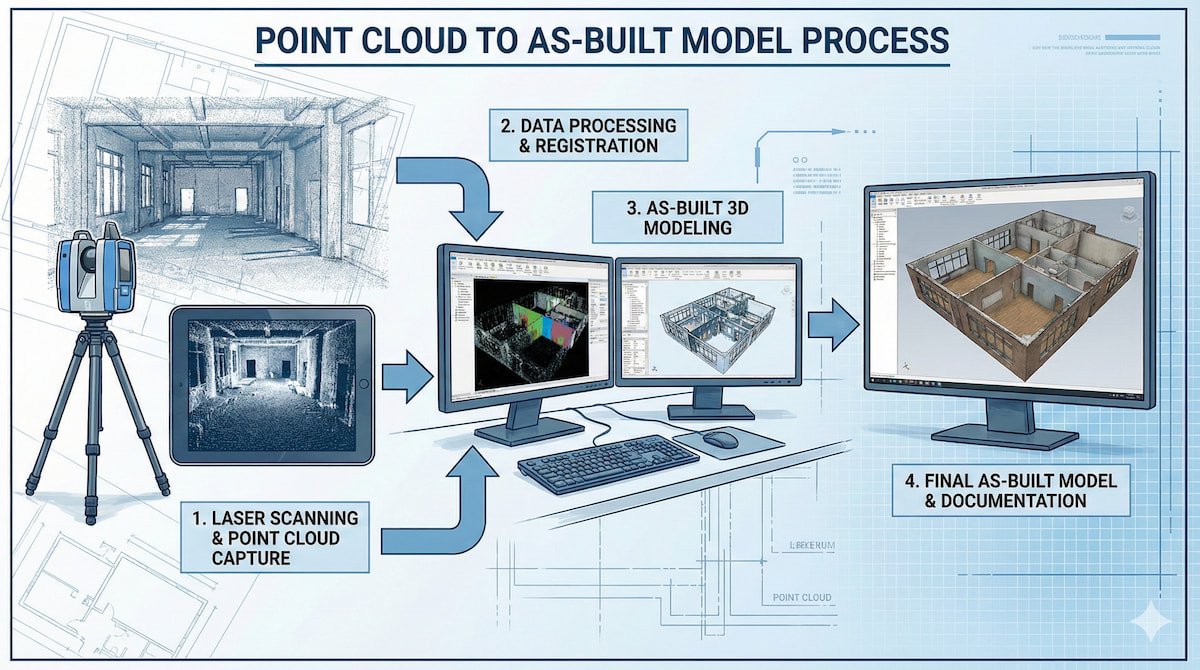
A typical workflow includes:
- Data capture and validation
- Point cloud processing and registration
- Modeling or drafting from scan data
- Quality checks and coordination
Without a clear workflow, point cloud data can become difficult to interpret, inconsistent, or inaccurate.
Why Structured Point Cloud Workflows Matter
As-built documentation is often used as the foundation for renovation, retrofitting, and upgrade projects. Errors introduced at the scan-processing stage can cascade through design and construction.
Accuracy and Reliability
Structured workflows ensure dimensional accuracy, alignment consistency, and correct interpretation of existing conditions.
Reduced Rework
Clear workflows reduce design revisions, site conflicts, and re-measurement during execution.
Faster Project Turnaround
Efficient data handling and modeling reduce overall documentation timelines.
Sources of Point Cloud Data in As-Built Projects
Point cloud data may originate from multiple scanning technologies depending on project scale and requirements.
- Terrestrial laser scanning (TLS)
- Mobile LiDAR scanning
- Matterport 3D scanning
- Drone-based photogrammetry
In many building-scale projects, Matterport scans are frequently used alongside traditional point cloud data to support documentation workflows.
Learn more about how Matterport and point clouds improve documentation efficiency in this detailed workflow guide: Using Point Clouds & Matterport for As-Built Documentation Workflow Efficiency.
Best Practices for Point Cloud to As-Built Conversion
Validate Scan Quality Before Modeling
Before starting any modeling or drafting work, point cloud data must be checked for:
- Complete spatial coverage
- Alignment and registration accuracy
- Noise, overlaps, or missing zones
Poor-quality scan data will always lead to unreliable outputs, regardless of modeling skill.
Define the Required Level of Detail (LOD)
Not every project requires the same level of detail. Defining LOD early helps avoid unnecessary modeling effort and keeps deliverables aligned with project needs.
- Basic layouts and dimensions
- Architectural elements
- Structural references
- MEP coordination (if required)
Use Discipline-Specific Modeling Approaches
Architectural, structural, and MEP elements should be interpreted separately from the same point cloud dataset to maintain clarity and accuracy.
Maintain True-to-Scale Geometry
Accurate snapping, reference planes, and section cuts are essential when converting dense point cloud data into clean CAD or BIM geometry.
Point Cloud to CAD vs Point Cloud to BIM Workflows
Point Cloud to CAD
This workflow is best suited for:
- 2D as-built drawings
- Renovation layouts
- Tender and approval documentation
CAD workflows focus on extracting accurate 2D information from 3D scan data.
Point Cloud to BIM
BIM workflows are more suitable for:
- Complex retrofit projects
- Multi-discipline coordination
- Clash detection and planning
BIM models require additional time and precision but offer greater long-term value.
Common Challenges in Point Cloud Workflows
- Over-modeling unnecessary details
- Inconsistent reference points
- Misinterpretation of dense scan data
- Coordination gaps between teams
Understanding how point clouds are reshaping CAD workflows can help avoid these challenges: How Point Clouds Are Changing the CAD World.
Integrating Matterport Data into Point Cloud Workflows
Matterport scans complement traditional point cloud data by providing:
- Visual context
- Faster site capture
- Improved spatial understanding
When used together, Matterport and point cloud data improve documentation accuracy and coordination.
To understand the fundamentals of 3D scanning technologies used in these workflows, refer to: 3D Scanning, Point Clouds, and Matterport Scans.
Quality Control in Point Cloud to As-Built Deliverables
Quality checks are essential before final delivery:
- Cross-verification of key dimensions
- Section-based validation
- Consistency across plans, sections, and elevations
- Stakeholder review and sign-off
Conclusion
Well-defined point cloud workflows are the backbone of accurate as-built modeling. By following best practices—from scan validation to disciplined modeling and quality control—project teams can unlock the full value of scan data.
Whether converting point clouds into CAD drawings or BIM models, a structured workflow ensures accuracy, reduces rework, and supports successful renovation, retrofit, and infrastructure projects.
Frequently Asked Questions
What is a point cloud workflow?
A point cloud workflow is the structured process of converting raw scan data into accurate CAD drawings or BIM models for as-built documentation.
Is point cloud data accurate enough for renovation projects?
Yes. When captured and processed correctly, point cloud data provides high accuracy suitable for most renovation and retrofit applications.
Should point clouds be converted to CAD or BIM?
CAD is suitable for 2D documentation needs, while BIM is recommended for complex projects requiring coordination and clash detection.
Can Matterport data be used with point cloud workflows?
Yes. Matterport scans are often integrated with point cloud workflows to enhance spatial understanding and documentation efficiency.